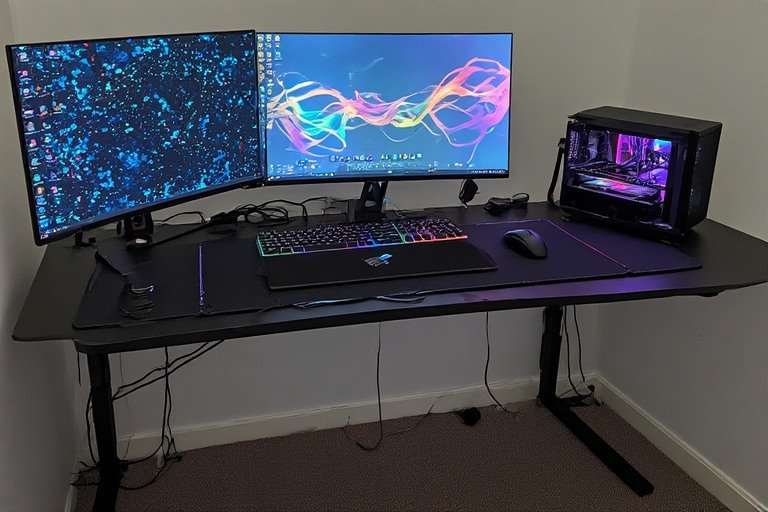
25 Gaming Desk Setup Ideas: Battlestations for Every Budget & Playstyle
Your gaming desk setup is more than just a place to play — it is your competitive advantage, your creative sanctuary, and your portal to digital worlds. Whether you are grinding ranked matches, building the ultimate gaming battlestation, or streaming to thousands of viewers, the right gaming desk setup ideas can elevate your performance, comfort, and overall experience. From a tight budget gaming desk setup under $500 to a full esports command center, this guide covers every scenario.
A high-quality gaming desk setup affects more than just your frame rate. Your monitor placement influences reaction time and reduces eye strain. Your chair’s ergonomics determine whether you can game for 8 hours without back pain. Your cable management separates distracting clutter from focused gameplay. Your lighting impacts both your visibility and your mood. These setup elements combine to create an environment where you perform at your best.
In this comprehensive guide, we explore 25 epic gaming desk setup ideas designed for every playstyle, budget, and aesthetic preference. You will discover minimalist setups that maximize focus, RGB-powered command centers that deliver immersive ambiance, budget-friendly builds that prove performance does not require deep pockets, and specialized setups optimized for streaming, competitive play, and creative work. Whether you are building your first rig or optimizing an existing space, these gaming desk setup ideas will inspire you to create the ultimate gaming station.
25 Gaming Desk Setup Ideas
1. RGB Gaming Command Center
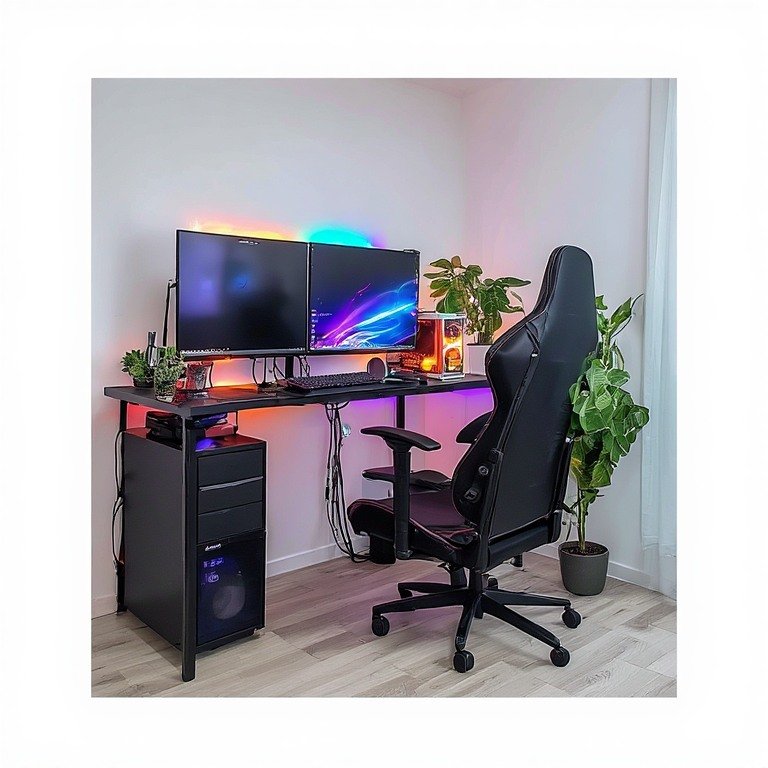
The RGB Gaming Command Center combines cutting-edge aesthetics with serious performance. Dual monitors sit front and center, with each screen framed by LED strips that react to in-game events. Cable management is hidden beneath the desk using a management tray, creating a clean, futuristic appearance. The keyboard and mouse sit on an oversized RGB mousepad that glows in sync with your peripherals.
This setup excels for streamers and content creators who benefit from the visual appeal of synchronized lighting. Use apps like SignalRGB or Razer Synapse to sync RGB elements across all devices. The large mousepad provides ample space for precise mouse movements, critical for competitive gaming. Consider a standing desk with RGB-lit cable trays for maximum visual impact.
Pro tip: Position your RGB elements so viewers can see them clearly if streaming. Use warm white or cool blue tones for extended sessions to reduce eye strain, and reserve flashy colors for competitive moments when adrenaline is high.
2. Minimalist Competitive Setup
Competitive esports players thrive in distraction-free environments. This minimalist gaming desk setup features one flat 27-inch monitor, a mechanical keyboard, and a specialized gaming mouse on a large mousepad. Everything is matte black or gunmetal gray. Cable management runs entirely under the desk, leaving the top surface completely clear.
Minimalism is not boring — it is deliberate. Every element serves a purpose. The monitor is sized for optimal reaction time without immersion-breaking peripherals. The keyboard is tenkeyless to maximize mouse space. The chair is ergonomic but simple. This setup prioritizes performance metrics: low latency, high refresh rates, and minimal input lag.
Implementation tip: Use wireless peripherals to reduce visible cables. Keep only essentials on the desk: monitor, keyboard, mouse, and a water bottle. Everything else goes in drawers or wall storage. Your desk should feel like a blank canvas where you play, not a showroom of gear.
3. Budget Gaming Desk Setup ($300–$600)
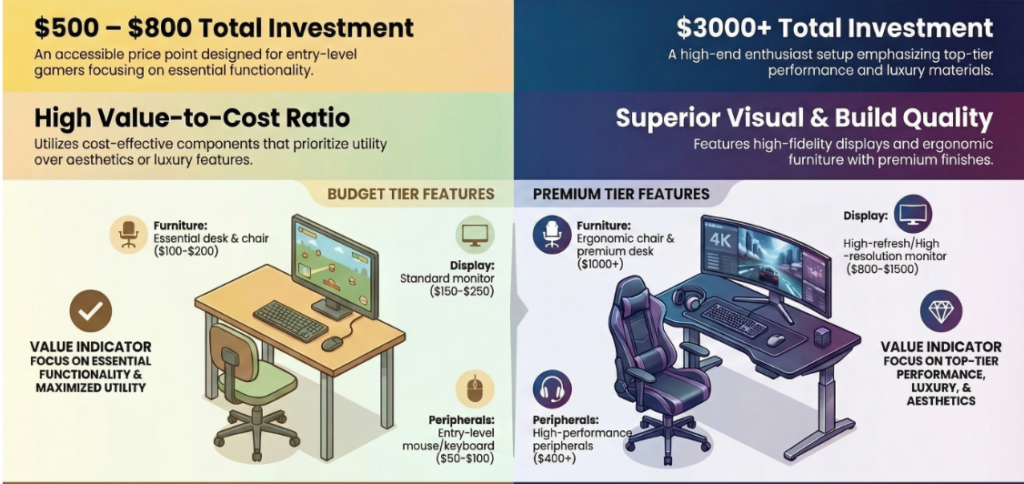
Not every quality setup requires a fortune. This budget gaming desk setup proves that smart choices deliver serious performance. Start with an affordable but sturdy desk — an IKEA LAGKAPTEN + ALEX combo is one of the most popular budget gaming foundations, giving you a wide surface and built-in storage for under $275. Add a refurbished monitor from a trusted seller and invest in a comfortable budget gaming chair rather than fancy aesthetics.
Prioritize comfort and functionality over RGB lighting and premium materials. A $150 monitor arm is worth more than a $300 desk lamp. A $100 ergonomic chair matters more than a $200 desk mat. Cable ties and velcro straps cost $15 but eliminate visual clutter. This budget gaming desk setup teaches an important lesson: performance thrives on intentional choices, not expensive impulses.
Money-saving strategy: Buy used equipment from Facebook Marketplace or Craigslist. Check for open-box deals at electronics retailers. Wait for holiday sales. Invest in quality ergonomics first, aesthetics second. Your health is the only expense you cannot return.
4. Streaming Setup with Green Screen
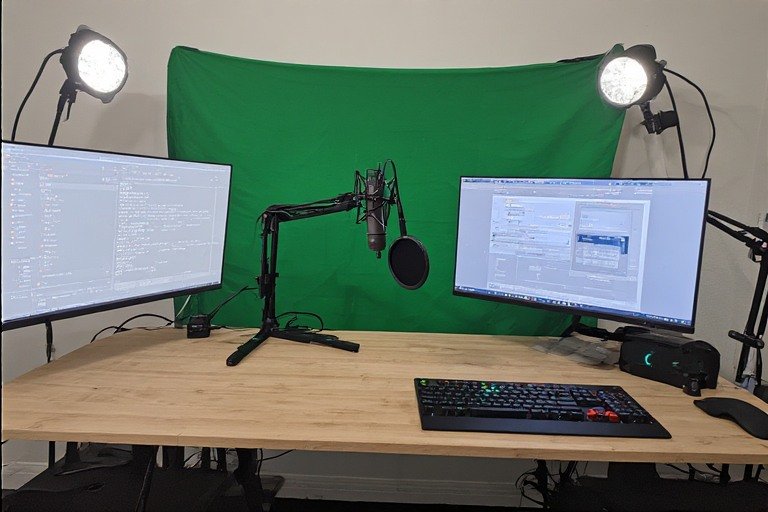
Streamers need gaming desk setup ideas that work on camera. This configuration features a gaming monitor on the right, an off-camera monitor displaying chat and stream metrics on the left, and a pop filter + microphone positioned between them. Behind the streamer sits a green screen for background replacement or a professionally lit backdrop.
The desk itself is an extended L-shape: one side for gaming, one side for streaming equipment. Lighting is critical — a ring light or panel lights eliminate harsh shadows on camera. Cable management is extreme: every wire must be hidden from the camera’s view. Consider camera angle carefully; your setup should look professional and uncluttered on stream.
Streaming tip: Position your camera at eye level to avoid unflattering angles. Use soft box lighting to reduce glare on monitors. Keep your desk surface visible but not cluttered — viewers enjoy seeing your reaction to gameplay. Test your camera angle before investing in permanent setup changes.
5. Triple Monitor Racing Setup
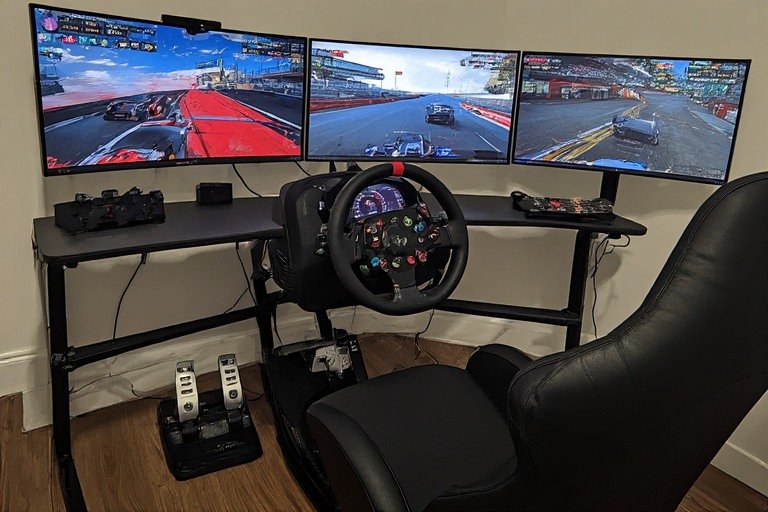
Racing simulator enthusiasts demand specialized gaming desk setup ideas. Three curved monitors create a 180-degree field of view, with the center screen displaying your game and the outer screens showing mirrors and peripheral visibility. A racing wheel sits on a desk-mounted rig, angled for natural arm positioning. Pedals sit on a floor platform for proper racing posture.
This setup requires triple the GPU power and careful monitor calibration to synchronize the display across all three screens. Cable management becomes complex; invest in a proper cable raceway system. The investment is substantial, but serious sim racers consider it essential for competitive play.
Racing setup considerations: Position monitors to eliminate visible bezels from your center view. Use bezel-correction software to adjust visuals across all three screens. Ensure your chair can swivel freely for complete visibility. Test your setup with your preferred racing game before finalizing.
6. Retro Gaming Nostalgia
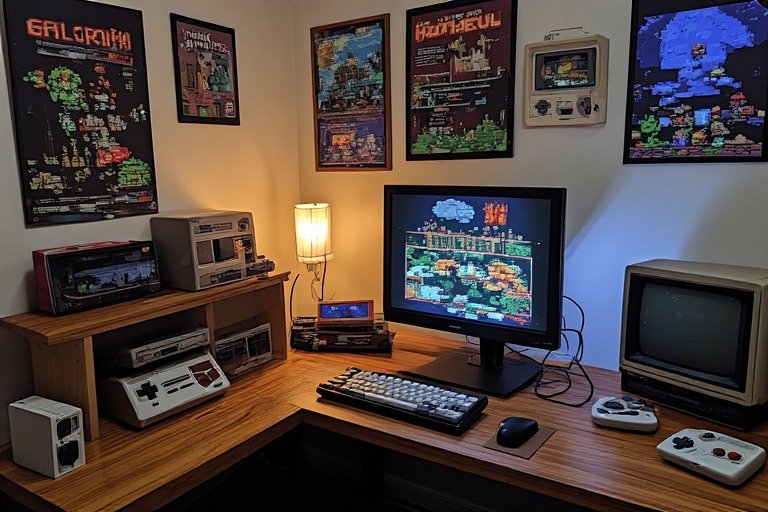
Nostalgic gamers love gaming desk setup ideas that celebrate retro classics. Vintage game posters and pixel art decorate the walls. A classic CRT-style monitor displays retro games with authentic visual presentation. Shelving displays Game Boys, cartridges, and collectible figures. The desk itself features wood tones and a simpler aesthetic than modern setups.
This setup combines functionality with personal identity. While modern hardware powers the gaming experience, the aesthetic celebrates gaming’s history. Many retro enthusiasts use emulators and original hardware together. Proper cable management remains important even in retro setups to prevent tangled wires from detracting from the visual theme.
Nostalgia setup tip: Source original game merchandise from online marketplaces. Use warm lighting to enhance the retro ambiance. Balance nostalgia with modern comfort; your retro setup should be enjoyable for extended play sessions.
7. Natural Light Gaming Workspace
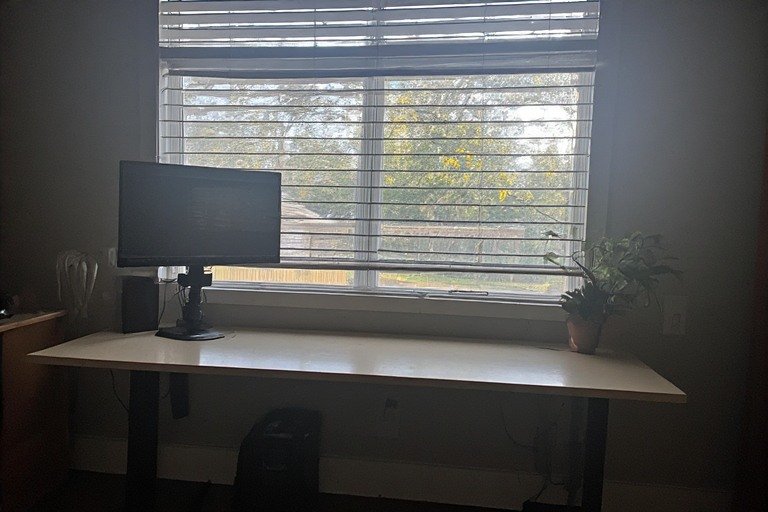
Gamers who also work from home need gaming desk setup ideas that transition between two roles. This setup positions your desk near a window to maximize natural light. Adjustable window blinds control glare on monitors. A monitor arm positions your screen at the perfect angle regardless of sunlight. The aesthetic is clean and professional enough for video calls, yet gaming-capable. For a full dual-purpose breakdown, see our work from home desk setup guide.
Natural light dramatically reduces eye strain compared to artificial lighting alone. It improves mood and energy levels during work hours. When evening comes and you transition to gaming, simple adjustable RGB strips or bias lighting provide gaming ambiance without looking unprofessional during the day.
Natural light tip: Position your monitor perpendicular to windows to minimize glare. Use light-colored desk surfaces to reflect available light. Invest in adjustable brightness monitors to adapt to changing light conditions throughout the day.
8. Compact Corner Battlestation
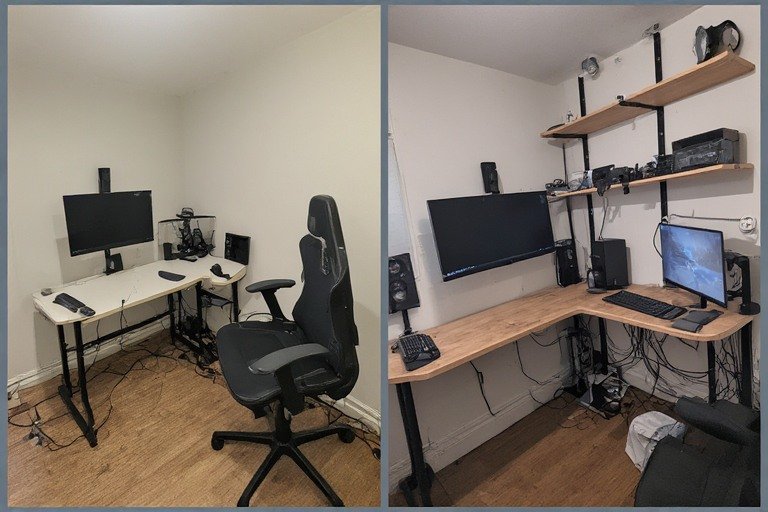
Small spaces demand clever gaming desk setup ideas. This corner configuration uses a triangular desk that fits snugly into room corners. Wall-mounted shelves provide storage without consuming floor space. A single curved monitor delivers an immersive experience without taking up significant desktop real estate. Cable management runs along the wall, completely hidden from view.
Compact setups teach efficiency. Every item serves multiple purposes. Floating shelves display collectibles while freeing floor space. Monitor arms eliminate bulky stands. Under-desk cable trays hide wires while increasing accessible desktop space. With smart planning, tiny rooms become functional gaming battlestations.
Compact design tip: Use vertical space aggressively. Mount everything you can. Choose one curved monitor over two flat ones for smaller spaces. Use corner desks specifically designed for tight areas. Minimize decoration; let the gaming setup itself become the room’s focal point.
9. Standing Gaming Desk Hybrid
Extended gaming sessions cause fatigue and posture problems. This gaming desk setup uses a motorized sit-stand desk that adjusts with a button press. Stand during warm-ups and important competitive moments. Sit during less intense games or during breaks. This approach combines the health benefits of standing desks with the comfort of traditional setups. For a full standing desk review, see our Fezibo electric standing desk guide.
Standing gaming desk setups cost more than traditional desks, but they solve real ergonomic problems. Your back thanks you after 6-hour gaming marathons. Standing increases blood flow and energy levels. Modern motorized desks are quiet and smooth, making transitions seamless even during gameplay.
Standing setup tip: Set preset heights for sitting and standing positions. Adjust every 30 minutes for optimal benefits. Wear comfortable shoes or use an anti-fatigue mat when standing. Start with 50/50 sitting-standing balance and adjust based on comfort.
10. Dual-Purpose Gaming + Work Setup
Many gamers also use their desk for creative work, study, or professional tasks. This gaming desk setup idea balances both roles. An extended L-shaped desk splits into zones: one side for gaming with a gaming monitor and peripherals, one side for work with office supplies and paperwork. Both sides share an ergonomic chair and task lighting. For ergonomic positioning advice that works for both roles, our ergonomic desk setup guide covers every adjustment.
The key to a successful dual-purpose setup is clear separation. Use different desk mats, monitor arms, or cable management for each side. When gaming, nothing on the work side distracts you. When working, gaming peripherals stay hidden. This intentional zoning prevents the setup from feeling like a disorganized jumble of equipment.
Dual-purpose tip: Use monitor arms that allow quick adjustments between tasks. Keep work and gaming supplies in separate drawers. Consider a desk organizer with labeled sections for each activity. Your setup should facilitate focus on whichever task is currently active.
11. Ultimate Cable Management Showcase
Cable clutter destroys even the most beautiful gaming desk setup ideas. This showcase configuration routes every single wire through under-desk cable trays, conduit sleeves, and wall-mounted raceways. RGB strips, monitor cables, keyboard wires, headset cables, and power cords all disappear from view. The result is impossibly clean aesthetics with zero visible wires.
Perfect cable management requires planning during the buying phase. Choose wireless peripherals where possible. Use cable labels so you know what goes where. Invest in quality cable management supplies; cheap ties degrade quickly. For more clean desk strategies that pair with a gaming setup, see our clean desk setup ideas guide.
Cable management tip: Plan your cable routes before installing anything. Use color-coded cable ties to identify wires by device. Leave extra slack for future upgrades. Label both ends of cables at your power supply and device. Document your cable layout photographically; future troubleshooting becomes trivial.
12. Immersive Ultrawide Surround
Ultrawide monitors deliver unmatched immersion for single-player games. This gaming desk setup features a 49-inch dual-monitor ultrawide or a true 49-inch display spanning your entire visual field. Combined with quality surround sound, this setup delivers cinema-like immersion. Perfect for story-driven games like RPGs and action-adventure titles.
Ultrawide setups require significant GPU power to maintain high frame rates. They are less ideal for competitive gaming where reaction time matters more than immersion. But for players who value narrative, exploration, and visual beauty, ultrawide immersion justifies the expense and hardware demands.
Ultrawide tip: Ensure your GPU can drive consistent frame rates at your ultrawide resolution. Many games offer ultrawide support, but some require community fixes. Adjust seat positioning to ensure your entire viewing angle is within comfortable peripheral vision.
13. Ambient Bias Lighting Setup
Lighting is often overlooked in gaming desk setup ideas, yet it profoundly affects both performance and health. This setup uses LED strip bias lighting mounted behind monitors and around desk peripherals. The light glows softly, reducing the contrast between bright monitors and dark surroundings. This dramatically reduces eye strain during extended sessions.
Bias lighting works because human eyes strain when adjusting between extremely bright and extremely dark environments. Choose warm color temperatures (3000K) for evening play to reduce blue light exposure. Choose neutral white (5000K) for daytime or competitive gaming. Your eyes will notice the difference immediately.
Bias lighting tip: Mount LED strips behind your monitor at eye level. Use diffuse covers to eliminate harsh shadows. Adjust brightness to match your monitor brightness. Experiment with color temperatures to find what feels most comfortable for your eyes.
14. Console Gaming Centerpiece
Console gamers need gaming desk setup ideas that differ from PC-centric builds. This setup features a comfortable gaming chair positioned facing a wall-mounted TV or large monitor. A console sits on a small side table or entertainment center. Controller charging stations keep multiple controllers ready. The aesthetic is living-room-like rather than tech-focused.
Console gaming setups can be more casual than PC setups. They work well for social gaming, couch co-op, and laid-back gaming sessions. The main consideration is seating comfort and viewing distance. Ensure your TV is large enough at your viewing distance; console games are designed for living room distances, not monitor distances.
Console setup tip: Position your TV at eye level when seated. Use a gaming chair that swivels and reclines for extended comfort. Keep controllers within arm’s reach of your seating position. Create a dedicated spot for your console that is well-ventilated.
15. Premium Esports Athlete Setup
Professional esports players demand uncompromising gaming desk setup ideas. This configuration features a high-performance gaming PC custom-built for competitive gaming. Multiple 240Hz+ monitors eliminate input lag. A premium ergonomic chair with adjustable lumbar support handles 12-hour practice sessions. Every cable is routed for absolute organization. Temperature control fans maintain optimal PC cooling.
The investment is substantial (often $5,000+), but professional esports requires this level of optimization. Every component is chosen for objective performance metrics. There is no room for compromise; a 1ms input lag difference can determine tournament outcomes.
Pro esports tip: Invest in quality over quantity. One premium monitor beats three mediocre ones. One great chair matters more than expensive lighting. Focus on performance metrics: refresh rate, response time, input lag. Train regularly on your setup so your muscle memory develops on your actual equipment.
16. Vertical Monitor Stacking
Stack one monitor vertically above another using dual monitor arms. Position your primary game on the lower screen and chat, overlay, or guide on the upper screen. This setup maximizes vertical screen real estate while minimizing desk footprint. Ideal for streamers, content creators, and multitasking gamers who need secondary displays without sacrificing desktop space.
Use adjustable monitor arms with adequate load capacity. Angle the upper monitor downward for comfortable viewing. Ensure your GPU supports both displays. This setup transforms vertical wall space into functional screen real estate.
17. Battlestation Wall Mount
Mount monitors directly to the wall using heavy-duty arms, eliminating monitor stands entirely. Wall-mount your PC tower using a specialized mount. Route all cables through wall conduits. The result is a futuristic, minimalist aesthetic where your entire gaming battlestation seems to float. Perfect for small spaces where every inch matters.
Wall mounting requires planning but delivers stunning results. Verify wall studs for secure mounting. Use cable management conduits that match your wall color. This approach transforms a cramped space into an elegant gaming area.
18. Dark Mode Aesthetic Gaming Setup
All-black gaming desk setup delivers sleek, professional aesthetics. Matte black furniture absorbs light. Cable management is almost invisible against dark surfaces. RGB accents pop against the dark background. This dramatic gaming desk setup idea suits competitive players and those who game primarily at night.
Black surfaces are forgiving; dust and minor scratches disappear into the matte finish. Dark environments reduce glare on monitors. The psychological effect of dark, focused spaces encourages concentration. Pair dark aesthetics with adjustable lighting to avoid creating a cave-like dungeon.
19. Modular Gaming Desk
Modular gaming desk setup ideas let you reconfigure as needs change. Use a desk with detachable sections that you can rearrange. Storage units slide in and out. Monitor arms adjust to different configurations. This flexibility is perfect for those whose gaming setup needs evolve with new games, new hobbies, or new living situations.
Modularity prevents expensive complete rebuilds; you simply rearrange components. Invest in quality, adaptable pieces rather than single-purpose solutions. IKEA’s modular system is a popular foundation — see our IKEA desk setup ideas guide for the best combinations.
20. Thermal-Optimized Build
Advanced gamers understand that heat kills performance. This gaming desk setup prioritizes airflow and cooling. Your PC sits on a desk-mounted platform with open ventilation on all sides. Tower fans circulate air around your setup. Cable management never blocks intake or exhaust vents. Thermal monitoring displays your PC temperature in real-time.
Thermal optimization extends hardware lifespan and maintains consistent performance. GPUs and CPUs throttle when overheating. Proper airflow maintains peak performance throughout gaming marathons. Temperature is often overlooked in gaming desk setup ideas but makes measurable performance differences.
21. Custom Desktop Artisan
Custom wooden desktops, epoxy surfaces, and handcrafted cable management transform a setup into functional art. Use wood stains that complement your monitor bezels. Epoxy tops combine durability with stunning aesthetics. Hand-wired cable management becomes a design feature. This gaming desk setup celebrates craftsmanship alongside gaming performance.
22. Content Creator Command Center
YouTubers, Twitch streamers, and TikTok creators need specialized gaming desk setup ideas. This configuration balances gameplay, recording equipment, lighting rigs, and background aesthetics. A large LED ring light illuminates your face. Microphone stands do not block gameplay. Multiple camera angles capture content from different perspectives. Cable management accounts for additional recording equipment.
23. Asymmetrical Split Setup
This creative gaming desk setup idea uses asymmetrical furniture placement. One monitor sits higher than the other. Desk heights vary across surface area. Cable management runs at different levels. Storage units sit at angles. The result is visually interesting and oddly functional once you understand the layout logic. Ideal for creative gamers who want their space to reflect their personality.
24. Portable LAN Party Kit
Some gamers take their setups on the road. This gaming desk setup idea features easily transportable components: a collapsible desk, wireless peripherals, a portable monitor arm, and compact speakers. Everything fits in a carry case. Perfect for attending LAN parties, esports tournaments, or visiting friends. Your setup is optimized for both home and travel.
25. VR Ready Command Center
VR gaming demands specialized gaming desk setup ideas. An open play area surrounds your desk for safe VR movement. Sensor placement is unobstructed. Cables routing to your PC do not create trip hazards. Controllers charge in a dedicated dock. A screen displays gameplay to spectators while you are immersed in VR. Proper ventilation handles the increased thermal load of VR hardware.
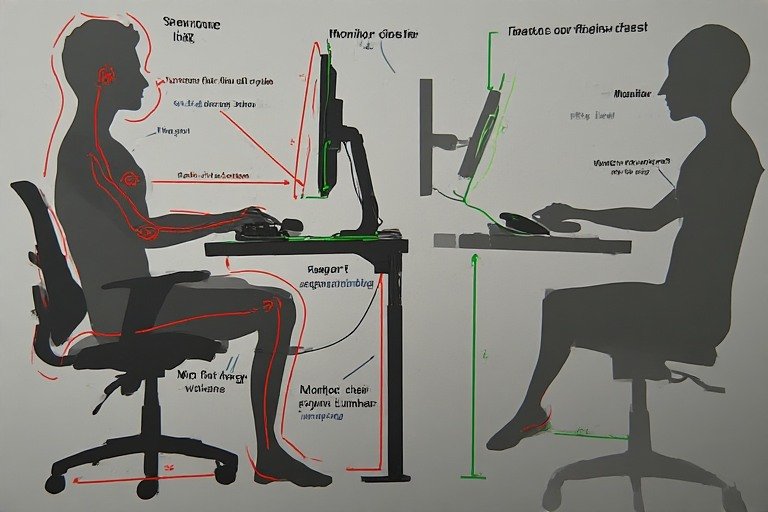
Gaming Desk Setup for Small Rooms & Tight Spaces
A small room does not mean a compromised gaming desk setup. The key is choosing the right footprint and building vertically. Here is exactly how to do it:
Choose the Right Desk Shape
For a gaming desk setup in a small room, an L-shaped corner desk gives you significantly more surface area than a straight desk while using dead corner space. A 47-inch straight desk forces you to choose between monitors and peripherals — an L-shaped desk lets you have both. IKEA’s LAGKAPTEN with matching tabletops is one of the most affordable ways to build a custom L-shaped gaming surface for under $300.
Mount Everything You Can
Monitor arms are mandatory in a small gaming desk setup — they eliminate bulky stands and free 6–8 inches of desk depth instantly. Wall-mounted shelves above the desk hold controllers, headsets, and figures without consuming a square inch of desktop. A wall-mounted PC tower mount removes your tower from the floor entirely, opening up the space dramatically.
Go Wireless
In a small gaming desk setup, cables feel overwhelming fast. A wireless keyboard, mouse, and headset eliminate the three most common cable runs immediately. A single USB-C dock handles your remaining connections from one point. The result is a clean, spacious-feeling desk regardless of the room size around it.
Gaming Desk Setup by Budget
Not all gaming desk setups require the same investment. Here is a realistic breakdown of what you get at each price tier and where to spend first.
Budget Gaming Desk Setup: Under $500
At this tier, start with an IKEA LINNMON + ADILS desk ($60–80), a used 1080p 144Hz monitor ($100–150), a budget mechanical keyboard ($50–80), and a wired gaming mouse ($30–50). Skip RGB entirely — invest that money in an ergonomic chair pad. Cable management with velcro ties and a $15 under-desk tray completes the look. This budget gaming desk setup outperforms most pre-built gaming desks at double the price because every dollar goes toward performance, not branding.
Mid-Range Gaming Desk Setup: $500–$1,500
This is where your gaming desk setup starts to feel premium. A KARLBY + ALEX IKEA combo gives you a wide, solid surface for $350–500. A 1440p 165Hz monitor ($250–350) provides a significant visual upgrade. A quality gaming chair ($200–350) pays for itself in comfort over long sessions. Add a monitor arm ($50–80), an under-desk cable tray, and basic LED bias lighting behind the monitor. See our IKEA desk setup ideas guide for the best desk combinations at this tier.
Premium Gaming Battlestation: $1,500+
At the premium tier, a motorized sit-stand desk ($400–700) becomes the foundation. Dual 27-inch 240Hz monitors on articulating arms ($600–900 combined) give you the competitive edge. A premium ergonomic chair ($400–700) handles marathon sessions without fatigue. Full wireless peripherals, a complete cable management system, and synchronized RGB lighting complete the gaming battlestation. For posture and positioning at this investment level, our ergonomic desk setup guide ensures every dollar translates into long-term comfort.
Gaming Desk Setup Essentials Checklist
Before spending on aesthetics, make sure these fundamentals are covered in your gaming desk setup:
- Monitor at eye level — top of screen should sit at or just below eye height. A monitor arm is the easiest fix.
- Chair height — feet flat on the floor, knees at 90°, elbows at desk height. Adjust before buying a new desk.
- Cable management — an under-desk tray ($15) is the single highest-ROI upgrade for any gaming desk setup.
- Desk depth — minimum 24 inches deep for a single monitor setup, 28+ inches for dual monitors with a keyboard tray.
- Desk width — 48 inches for single monitor, 60+ inches for dual monitors, 74+ inches for triple monitors or KARLBY builds.
- Lighting — bias lighting behind your monitor costs $20 and immediately reduces eye strain during long sessions.
- PC ventilation — your tower needs at least 6 inches clearance on intake and exhaust sides. Never push it into an enclosed cabinet.
Frequently Asked Questions
What is a good gaming desk setup for beginners?
A good beginner gaming desk setup starts with a sturdy desk at least 47 inches wide (IKEA LAGKAPTEN + ADILS legs is a popular starting point), a 1080p 144Hz monitor, and a comfortable chair. Prioritize ergonomics over aesthetics — get your monitor at eye level with a cheap arm, manage your cables with velcro ties, and add RGB lighting only after everything functional is sorted. Total cost can be kept under $400 with smart buying.
How do I set up a gaming desk in a small room?
For a gaming desk setup in a small room, use an L-shaped corner desk to maximize surface area, mount your monitor on an arm to reclaim desk depth, and go wireless to eliminate cable clutter. Build vertically with wall shelves above the desk instead of expanding horizontally. A single curved ultrawide monitor gives you immersive screen real estate without the footprint of dual flat monitors.
What desk does most gaming battlestations use?
The most popular gaming battlestation desk is the IKEA KARLBY countertop (74 inches) supported by two ALEX drawer units. This combination is wide enough for dual or triple monitors, solid enough for monitor arm clamps, and provides ten built-in storage drawers for cables and peripherals. It dominates Reddit battlestation posts and YouTube setup tours because it delivers a premium feel at a mid-range price ($350–500 total).
How much should I spend on a gaming desk setup?
A functional budget gaming desk setup starts around $300–400 (desk + monitor + chair + cable management). A mid-range setup with a quality monitor, IKEA desk combo, and ergonomic chair runs $800–1,200. A premium gaming battlestation with a sit-stand desk, dual high-refresh monitors, and full peripherals typically costs $2,000–4,000. Spend on ergonomics first — chair and monitor positioning — before any aesthetic upgrades.
What size desk do I need for a gaming setup?
For a single monitor gaming setup, a desk at least 47–55 inches wide works well. Dual monitor setups need 60–74 inches of width to avoid feeling cramped. Triple monitor or ultrawide rigs need 74–98 inches. Depth matters too — aim for at least 24 inches so your monitor sits far enough from your face to avoid eye strain.
Is an IKEA desk good for gaming?
Yes — IKEA desks are among the most popular gaming desk foundations in the world. The KARLBY + ALEX combination is arguably the most photographed gaming battlestation desk on the internet. The thick KARLBY countertop handles monitor arm clamps without issue, and the ALEX drawers provide storage for all your peripherals. For a complete guide to building an IKEA gaming desk, see our IKEA desk setup ideas guide.
Final Thoughts
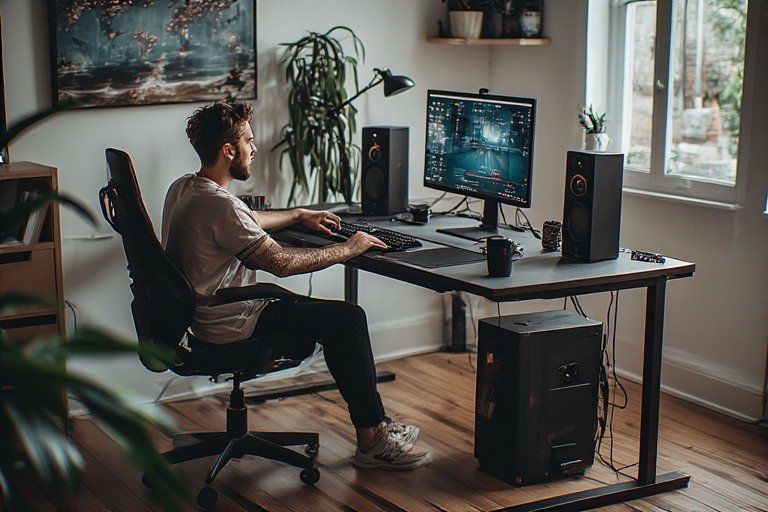
Your gaming desk setup is deeply personal. It reflects your gaming style, your budget, your aesthetic preferences, and your priorities. Whether you are building a minimalist competitive rig, an RGB-powered streaming command center, a budget gaming desk setup under $500, or a full gaming battlestation with a sit-stand desk and dual 240Hz monitors — the right gaming desk setup ideas are out there for every scenario.
The best setup is not the most expensive one. It is the one that makes you want to spend hours in your chair, fully engaged in the games you love. Start with the gaming desk setup ideas that resonate with your playstyle, build intentionally, and let your setup evolve as your needs change.
Explore more: IKEA Desk Setup Ideas | Minimalist Desk Setup Ideas | Small Desk Setup Ideas | Clean Desk Setup Ideas | Ergonomic Desk Setup | All Desk Setup Ideas