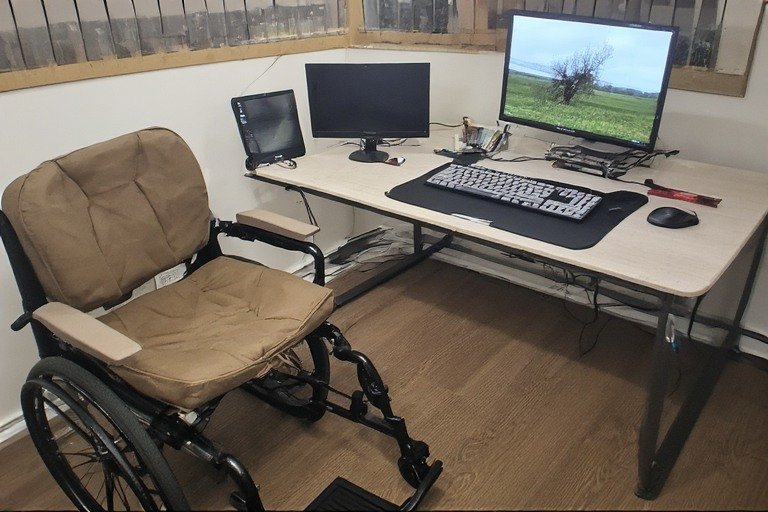
Ergonomic
Everything you need to build a comfortable, compliant, and productive desk setup as a wheelchair user — from the right desk height and ADA requirements to storage solutions, desk attachments, and adjustable table options.
📋 In This Guide
- Why Wheelchair Desk Setup Matters
- Wheelchair Accessible Desk Height — The Numbers
- ADA Desk Requirements Explained
- Best Computer Desk for Wheelchair Users
- Wheelchair Accessible Desk with Storage
- Wheelchair Desk Attachment Options
- Adjustable Tables for Wheelchair Users
- Full Setup Tips: Monitor, Keyboard & Accessories
- Frequently Asked Questions
Related Reading This guide focuses on wheelchair-specific desk setup. For the complete ergonomic picture, see our Ergonomic Desk Setup: The Complete Guide. For exact height measurements by wheelchair type, see our ideal desk height for wheelchair users section.
Why Wheelchair Desk Setup Matters
A well-designed wheelchair desk setup is not just about comfort — it directly affects your ability to work productively, avoid pain, and maintain independence throughout the day. Standard desks are built for standing or seated-chair users, which means most off-the-shelf options fail wheelchair users on at least one critical dimension: knee clearance, surface height, or reach distance.
Getting the setup right means finding a desk where your elbows rest at 90 degrees while your forearms are parallel to the ground, your wheelchair fits cleanly beneath the surface, and everything you need is within comfortable reach without excessive stretching or leaning. When those three things are achieved, fatigue drops, pain decreases, and focus improves significantly.
Whether you’re setting up a home office, advocating for workplace accommodations, or outfitting a classroom, this guide covers every decision you need to make.
Wheelchair Accessible Desk Height — The Numbers
The wheelchair accessible desk height that works for you depends on your wheelchair’s seat height, any cushion thickness you use, and your individual arm length. That said, most wheelchair users find their ideal desk surface height falls between 28 and 32 inches from the floor.
Here’s how to measure it accurately:
- Sit in your wheelchair in your typical working position.
- Relax your arms at your sides completely, shoulders loose.
- Bend your elbows to 90 degrees with forearms pointing forward, parallel to the ground.
- Measure from the floor to the bottom of your forearms. That is your target desk height.
- Confirm there is enough knee and toe clearance beneath the desk for your wheelchair before finalizing.
| Wheelchair Type | Typical Seat Height | Typical Ideal Desk Height | Notes |
|---|---|---|---|
| Manual wheelchair (standard) | 17–20″ | 27–30″ | Varies by cushion thickness |
| Power wheelchair | 18–22″ | 28–32″ | Seat tends to be slightly higher |
| Tilt-in-space wheelchair | Varies | Measure individually | Seat angle changes elbow height |
| Sports / lightweight chair | 15–18″ | 25–28″ | Lower seat = lower desk needed |
Key Rule Always measure your own elbow height rather than assuming a number from a chart. Wheelchair seat heights vary widely — even between chairs of the same type — and individual body proportions shift the ideal desk height by 1–3 inches.
ADA Desk Requirements Explained
If you’re setting up a workplace or educational environment, understanding ADA desk requirements is essential. Under the 2010 ADA Standards for Accessible Design, work surfaces in accessible spaces must meet specific height and clearance minimums.
Here are the key ADA desk requirements you need to know:
| Requirement | ADA Standard | Section Reference |
|---|---|---|
| Work surface height (adults) | 28″ – 34″ above finished floor | Section 902.3 |
| Work surface height (children) | 26″ – 30″ above finished floor | Section 902.4 |
| Knee clearance height | Minimum 27″ from floor to desk underside | Section 306.3.1 |
| Knee clearance depth (at 27″) | Minimum 8″ forward | Section 306.3.3 |
| Horizontal knee clearance width | Minimum 30″ wide | Section 306.3.5 |
| Minimum accessible workstations | At least 5% of all workstations | Section 226.1 |
For employers, the ADA also requires “reasonable accommodations” for employees with disabilities — which includes adjusting or replacing workstations to meet the needs of a wheelchair user. A height-adjustable desk is the most practical and future-proof solution for meeting these requirements.
Important Note ADA compliance sets the minimum standard — not the ergonomic ideal. A desk at 34 inches may be ADA-compliant but still too high for a specific wheelchair user. Always use the elbow-height measurement method alongside ADA guidelines.
Best Computer Desk for Wheelchair Users
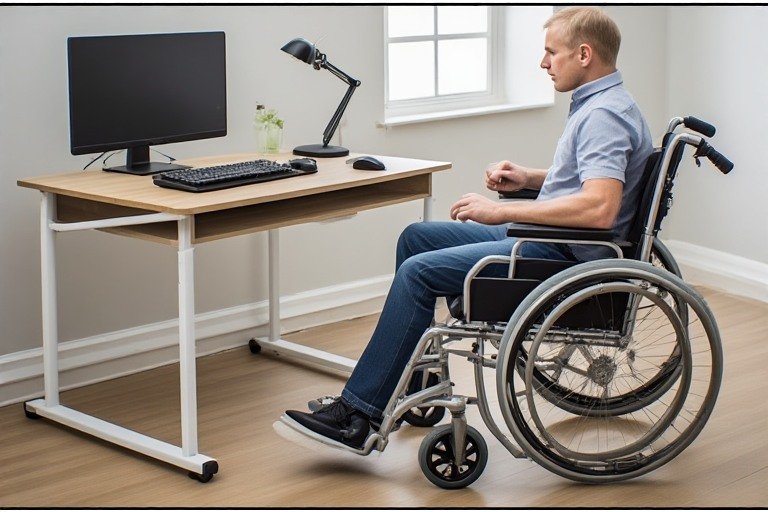
The best computer desk for wheelchair users has four non-negotiable features: an open-front base with no center leg or apron blocking knee space, a surface height that can be set between 27–34 inches, sufficient under-desk clearance (minimum 27″ floor to underside), and a surface deep enough (at least 24 inches) to place a monitor at a comfortable distance.
Here are the main desk types that work well:
Electric Height-Adjustable Desk
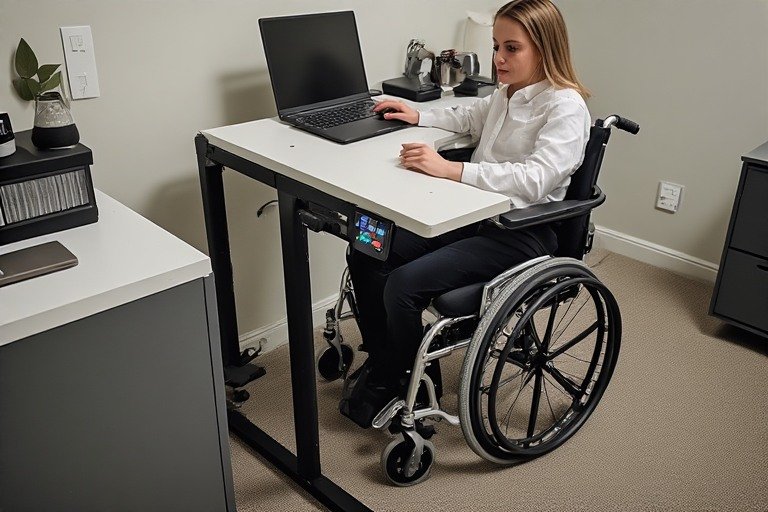
The top choice for most wheelchair users. An electric sit-stand desk with an open-frame base and no crossbar allows full knee and wheelchair clearance beneath the surface. Look for a desk that goes as low as 24–27 inches on the lower end of its range. Push-button controls should be reachable from a seated wheelchair position — typically on the side of the desk frame rather than the back.
Hand-Crank Adjustable Desk
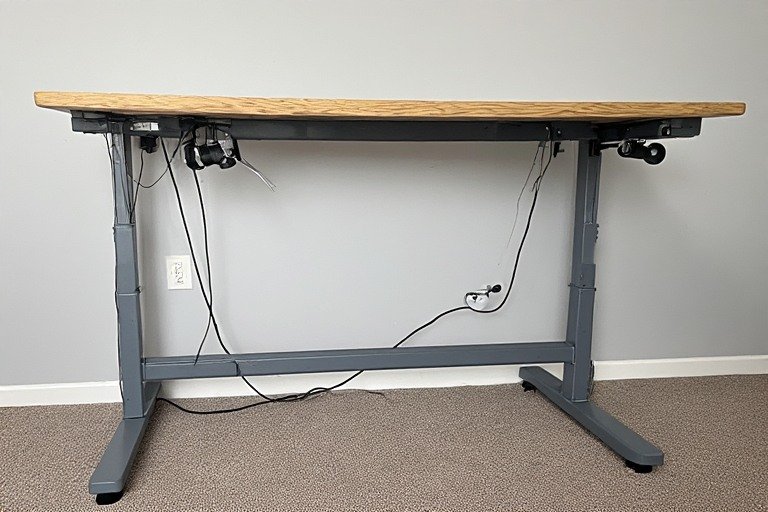
A more budget-friendly option than electric. Hand-crank desks adjust via a crank mechanism mounted under or on the side of the frame. They’re slower to adjust than electric models but significantly more affordable and still fully functional for users who don’t need to change heights frequently. The crank should be easy to reach and turn without excessive grip strength required.
Fixed-Height Open-Frame Desk
If your wheelchair seat height is consistent and you’ve confirmed the exact desk height you need, a simple open-frame desk set to the right height is a reliable and affordable option. The key requirement is the open-front design — no center drawer, no modesty panel, and no structural crossbar at knee height.
Wheelchair Accessible Desk with Storage
Storage is one of the trickiest elements of a wheelchair accessible desk with storage — because the under-desk clearance required for wheelchair access eliminates the drawers and cabinets that standard desks typically use for storage.
Here’s how to solve the storage problem without sacrificing accessibility:
Side-Mounted Drawers
Some desks offer optional drawers that mount to the side of the frame rather than beneath the surface — keeping the knee clearance zone completely open. These are the cleanest integrated storage solution for wheelchair users.
Separate Rolling Storage Unit
A rolling file cabinet or pedestal unit placed beside (not under) the desk keeps your documents, supplies, and accessories within reach without blocking wheelchair access. Look for units with large easy-grip drawer handles and smooth casters.
Desktop Organizers and Monitor Arms
Moving storage to the desktop surface itself — using monitor arms, vertical organizers, cable trays, and desktop shelves — frees up the under-desk space entirely while keeping everything accessible. A monitor arm is particularly valuable because it lets you position the screen at the exact right height and distance without taking up surface space.
Wall-Mounted Shelving
Shelves mounted on the wall beside or above the desk keep storage accessible without interfering with the desk footprint at all. Position shelves within comfortable reach from your seated wheelchair position — typically no higher than 48 inches from the floor.
Wheelchair Desk Attachment Options
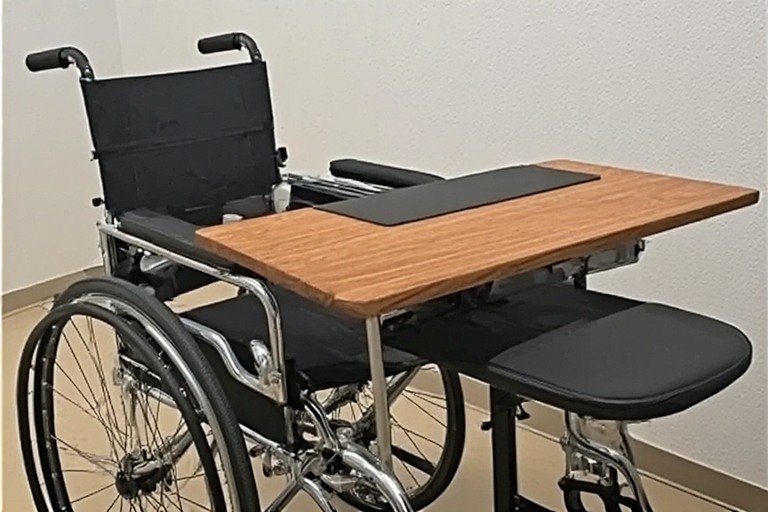
A wheelchair desk attachment is a portable work surface that mounts directly to the wheelchair itself — either via the armrests or a dedicated mounting bracket. These are particularly useful when you need a work surface in locations where a standard desk isn’t available, or when full desk setup isn’t practical.
Armrest-Mounted Tray
The most common type of wheelchair desk attachment. A flat tray surface clips or slides onto the wheelchair armrests, providing a small working surface for a laptop, tablet, or writing materials. Look for trays with a raised lip to prevent items from sliding off, and a cutout or curved edge that allows the tray to fit closer to the user’s body.
Swivel Lap Tray
Swivel trays attach to the wheelchair frame and can be swung in and out of position as needed. They’re more flexible than fixed armrest trays and allow the user to move the work surface out of the way quickly when not in use.
Clamp-On Keyboard Tray
For users who work primarily at a desk but need the keyboard and mouse closer than the desk surface allows, a clamp-on keyboard tray mounted to the desk edge brings the input devices within easier reach, reducing the need to stretch forward into the desk. This is particularly helpful for power wheelchair users where the chair’s footprint pushes the user slightly further from the desk surface.
Tip A wheelchair desk attachment is best used as a supplement to a proper desk setup — not a replacement. The ergonomics of working on a small lap tray for hours are significantly worse than a properly set up accessible desk. Use attachments for portability and short tasks; use a full desk for sustained work.
Adjustable Tables for Wheelchair Users
Adjustable tables for wheelchair users are the single most flexible and future-proof solution available. Because wheelchair seat heights vary between users and change over time (due to cushion changes, chair upgrades, or medical changes), a fixed-height desk will eventually need to be replaced or modified. An adjustable table eliminates that problem entirely.
When shopping for adjustable tables for wheelchair users, look for these specifications:
- Height range: minimum 24″ at the low end, at least 34″ at the high end
- Crossbar-free base: no structural crossbar at knee height — this is the most commonly overlooked spec when purchasing sit-stand desks for wheelchair use
- Control location: push-button or hand-crank controls reachable from a seated wheelchair position
- Surface depth: at least 24″ to allow monitor placement at arm’s length
- Surface width: 48″ minimum; 60″–72″ preferred for a full accessible workstation
- Weight capacity: verify the desk supports the weight of your full setup including monitors and accessories
Electric motor desks with programmable height presets are particularly convenient — you can save your exact wheelchair height as a preset and return to it instantly at any time, which is especially helpful in shared workspaces.
Full Setup Tips: Monitor, Keyboard & Accessories
Getting the desk height right is the foundation — but these additional setup elements complete an accessible, comfortable workspace.
Monitor Height and Distance
The top of your monitor should sit at or just below your eye level, with the screen approximately arm’s length away (20–26 inches). A monitor arm is strongly recommended — it lets you adjust the screen height and distance precisely without relying on the desk surface, and it frees up valuable workspace. For more detail on monitor placement, see our complete ergonomic desk setup guide.
Keyboard and Mouse Placement
Your keyboard and mouse should sit on the desk surface at the same height your elbows naturally rest — which is your desk height. Keep both within easy reach to minimize lateral shoulder movement. A wireless keyboard and mouse give you the flexibility to reposition them without being limited by cable length, which is particularly useful when you need to move items closer. A trackball mouse is worth considering as an alternative — it requires no wrist movement to navigate and reduces reaching significantly.
Cable Management
Clean cable management is especially important in a wheelchair workspace because loose cables on the floor create a safety hazard. Use cable trays mounted under the desk edge, velcro cable ties, and a cable spine along the desk leg to route all cables away from the floor and the wheelchair’s path.
Reaching Distance
Keep everything you use regularly within a comfortable reach from your seated wheelchair position. Items placed on the desk should be within 16–18 inches of reach; anything further requires leaning or stretching that builds up fatigue. A monitor arm, wireless peripherals, and a voice assistant can all reduce the need to reach across the workspace.
Related Reading For the exact ideal desk height for a person sitting in a wheelchair — including a measurement guide and ADA height range — see our full ideal desk height guide.
Frequently Asked Questions
What is the ideal desk height for a wheelchair user?
The wheelchair accessible desk height for most users falls between 28 and 32 inches, though the exact number depends on your wheelchair seat height and individual body proportions. Use the 90-degree elbow rule — sit in your wheelchair, relax your arms, bend your elbows to 90 degrees, and measure from the floor to the bottom of your forearms. That measurement is your target desk height.
What are the ADA desk requirements for wheelchair users?
Under the 2010 ADA Standards, work surfaces must be between 28 and 34 inches in height, with at least 27 inches of knee clearance beneath the desk and a minimum horizontal knee clearance of 30 inches wide. At least 5% of workstations in a facility must meet these accessibility standards.
What is the best computer desk for wheelchair users?
The best computer desk for wheelchair users is an electric height-adjustable desk with an open-frame, crossbar-free base. Look for a desk that reaches as low as 24–27 inches, has push-button controls reachable from a seated position, and provides at least 27 inches of clearance beneath the surface. Open-front design with no center leg or apron is essential.
Can I get a wheelchair accessible desk with storage?
Yes — though under-desk drawers won’t work because they block knee clearance. The best storage solutions for a wheelchair accessible desk with storage are side-mounted drawers, a rolling file pedestal placed beside the desk, desktop organizers, and wall-mounted shelving within comfortable reach.
What is a wheelchair desk attachment?
A wheelchair desk attachment is a portable work surface — usually a tray or flat panel — that mounts directly to the wheelchair armrests or frame. It’s useful for short tasks or mobile situations but is not a substitute for a full accessible desk setup for sustained work.
Are adjustable tables for wheelchair users worth it?
Adjustable tables for wheelchair users are highly recommended because wheelchair seat heights change over time and vary between users. A height-adjustable desk with programmable presets lets you set the exact right height for your chair and return to it instantly — especially useful in shared workspaces where the desk may be used by multiple people.
More Guides on EVRHub
- Ergonomic Desk Setup: The Complete Guide (2026)
- Ideal Desk Height: Complete Guide for Every Height (With Chart)
- Work From Home Desk Setup: The Complete 2026 Guide
- Carpal Tunnel Desk Setup: Fix Wrist Pain With 7 Setup Changes
- Wrist Pain From Mouse: Causes, Fixes & Best Ergonomic Mice
- Laptop Desk Setup Ideas: Best Stands, Peripherals & Layouts
- Small Desk Setup Ideas: Maximize Ergonomics in a Tight Space
- Desk Setup Ideas: Clean, Productive Workspace Inspiration
Sources: 2010 ADA Standards for Accessible Design, Sections 226, 306, 902 — U.S. Department of Justice · OSHA Computer Workstations eTool · Mayo Clinic Office Ergonomics Guide · Human Factors and Ergonomics Society · NIOSH Musculoskeletal Disorder Guidelines
© 2026 EVRHub — Desk Setup Ideas for a Clean, Productive Workspace