
That dull ache in your wrist that builds through the afternoon. The stiffness when you reach for the mouse first thing in the morning. The tingling that starts after two hours of clicking and scrolling.
Wrist pain from mouse use is one of the most common desk injuries — and one of the most fixable. Unlike chronic back problems that take months to address, most mouse-related wrist pain responds quickly to a handful of targeted changes. Many people feel significant relief within days.
This guide covers exactly what’s causing your pain and the six fixes that have the most evidence behind them — starting with the ones you can do in the next five minutes.
🔎 Quick Self-Test — Is Your Mouse the Problem?
Answer yes/no to these right now:
- Is your wrist bent upward while using the mouse?
- Is your mouse more than a few inches from your keyboard?
- Are you resting your wrist on the desk and pivoting from that point?
- Does your elbow extend away from your body when mousing?
- Do you grip the mouse tightly rather than resting your hand on it?
2+ yes answers = your setup is directly causing or worsening your wrist pain.
📋 In This Guide:
- What Type of Wrist Pain Do You Have?
- Fix 1 — Mouse Position on Your Desk
- Fix 2 — How You’re Moving the Mouse
- Fix 3 — Mouse Type & Size
- Fix 4 — DPI Settings (The Hidden Fix)
- Fix 5 — Your Wider Desk Setup
- Fix 6 — Stretches & Micro-Breaks
- Quick Fix Checklist
- When to See a Doctor
1. What Type of Wrist Pain Do You Have?
Not all mouse-related wrist pain is the same — and knowing the type helps you target the right fix first.
| Pain Type | Symptoms | Most Likely Cause |
|---|---|---|
| Muscle fatigue | Soreness during use, eases with rest | Sustained grip tension, no breaks |
| Tendonitis | Sharp pain when gripping or twisting, inflamed | Forearm pronation, repetitive clicking |
| Carpal tunnel | Tingling/numbness in thumb & first 3 fingers, worse at night | Wrist extension, direct nerve compression |
| Mouse arm syndrome | Pain spreading from wrist to elbow and shoulder | Arm extended away from body, poor positioning |
Muscle fatigue and early tendonitis respond fastest to the fixes below — often within days. Carpal tunnel and mouse arm syndrome take longer and may need professional evaluation if symptoms persist beyond 4 weeks of changes. If you suspect carpal tunnel specifically, our carpal tunnel desk setup guide goes deeper on the nerve compression angle.
Fix 1 — Mouse Position on Your Desk
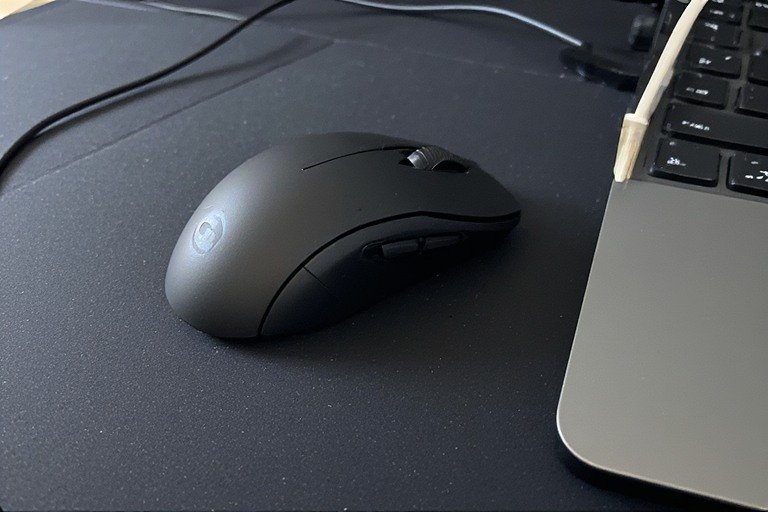
Where your mouse sits on your desk is the single biggest driver of wrist pain — more than the mouse itself. Most people place the mouse too far away and too far to the side, forcing a combination of shoulder abduction and wrist deviation that loads the tendons constantly.
The Three Rules of Mouse Position
- Right next to your keyboard — no gap. The mouse should start where the keyboard ends. Even a 3-inch gap forces your elbow away from your body and your wrist into ulnar deviation (angling toward the pinky) every time you reach for it.
- At the same height as your keyboard. A mouse on a higher or lower surface than your keyboard creates a wrist angle change every time you switch between the two — hundreds of times a day.
- Close to your body — elbow near your side. Your upper arm should hang naturally with your elbow close to your ribs while mousing. If your elbow is extending outward, your mouse is too far away.
💡 The Tenkeyless Fix: If you use a full-size keyboard with a numpad, the numpad alone is pushing your mouse 3–4 inches further from your body than it needs to be. Switching to a tenkeyless (TKL) or compact keyboard brings the mouse significantly closer — often eliminating shoulder and wrist pain without changing anything else.
Desk Work Zones
Think of your desk in three zones. Zone 1 — the area you can reach with your elbows at your sides — is where your keyboard and mouse must live. To find it: let your arms hang naturally, bend your elbows to 90°, and sweep your forearms across the desk. That arc is Zone 1. If your mouse sits outside it, you’re adding load to your wrist on every single movement.
Fix 2 — How You’re Moving the Mouse
Most people with mouse wrist pain are moving the mouse with their wrist — pivoting from a resting point on the desk. This is the movement pattern that causes the most damage because it combines wrist rotation with sustained compression at the same point.
Arm Movement vs Wrist Movement
Wrong: Plant your wrist on the desk and move the cursor by rotating the wrist side to side.
Right: Keep your wrist straight and move the cursor by gliding your entire forearm — the movement comes from your elbow and shoulder, not your wrist joint.
This feels unfamiliar at first because most people have been mousing wrong for years. Give it a week and it becomes natural — and the reduction in wrist load is significant.
Grip Tension
Gripping the mouse tightly is another major contributor. You don’t need to hold the mouse — you just need to guide it. Consciously relax your hand so your palm rests on the mouse body and your fingers sit lightly on the buttons. Tight grip = constant forearm muscle contraction = fatigue and tendon inflammation.
✅ Check right now: Pick up your mouse. Can you feel tension in your forearm? Consciously relax your grip until you can’t. That’s the level of contact you’re aiming for all day.
Fix 3 — Mouse Type & Size
A standard flat mouse forces your forearm into full pronation — rotated palm-down — which twists the forearm bones (radius and ulna) against each other and creates sustained tension in the muscles and tendons. This is the fundamental design flaw of the standard mouse.
Mouse Types Compared
| Mouse Type | Forearm Position | Best For | Wrist Pain Benefit |
|---|---|---|---|
| Standard flat mouse | Full pronation (palm down) | — | None — root cause of most mouse pain |
| Vertical mouse | Handshake position (neutral) | Most desk workers | High — eliminates forearm twisting |
| Trackball | Neutral, stationary hand | Active symptoms, small desks | Very high — eliminates wrist movement entirely |
| Angled ergonomic mouse | Partial pronation (30–45°) | Transition from standard | Medium — reduces but doesn’t eliminate pronation |
| Pen mouse / stylus | Pencil grip, upright | Creative work | High — natural grip, minimal forearm load |
Mouse Size Matters Too
A mouse that’s too small forces a claw grip where your fingers are permanently bent under tension. A mouse that’s too large forces your hand to stretch open. The right size lets your palm rest fully on the body with fingers naturally curved over the buttons — no stretching, no clenching.
General sizing guide: measure from your wrist crease to the tip of your middle finger.
- Under 6.5 inches → small mouse
- 6.5–7.5 inches → medium mouse
- Over 7.5 inches → large mouse
Fix 4 — DPI Settings (The Fix Nobody Mentions)
DPI (dots per inch) controls how far your cursor moves relative to physical mouse movement. This has a direct impact on wrist strain — and most people have it set wrong.
Low DPI vs High DPI for Wrist Pain
Too low DPI (under 400): cursor moves slowly, so you make large sweeping arm movements. High physical effort per action. More shoulder and elbow load.
Too high DPI (1600+): cursor flies across the screen with tiny wrist movements. This sounds better but actually encourages small, rapid, high-frequency wrist twitches rather than larger arm movements — which is more damaging to tendons over time.
The sweet spot for wrist health: 800–1200 DPI — sensitive enough that you’re making comfortable arm movements, not so sensitive that you’re micro-adjusting with your wrist all day.
Pair this with a medium-large mouse mat so you have enough surface to move your forearm rather than your wrist.
Fix 5 — Your Wider Desk Setup
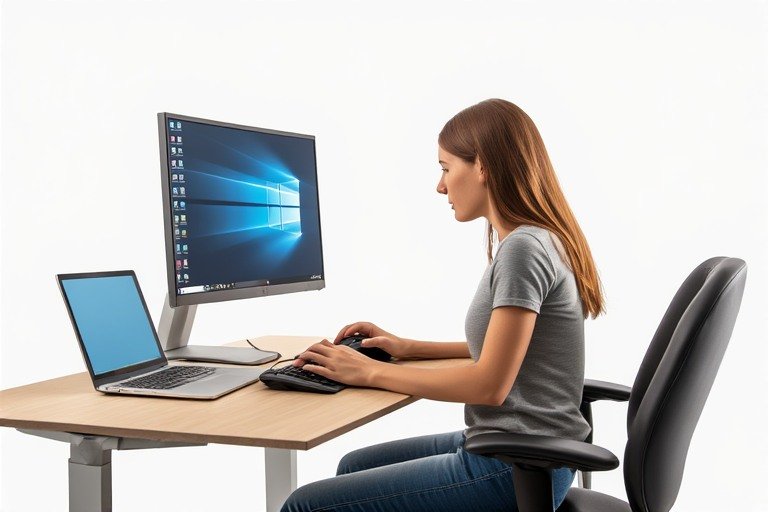
Mouse pain is rarely just a mouse problem. Your chair height, desk height, and monitor position all directly affect how much load ends up in your wrist. This is the wider ergonomic desk setup context that most mouse-focused guides ignore.
Chair & Desk Height
If your desk is too high, your shoulder shrugs to reach the mouse — which transfers tension down the arm into the wrist. Your elbow should be at approximately desk height when your arm hangs relaxed. If it isn’t, your wrist is compensating on every single mouse movement.
Armrest Position
Properly positioned armrests take the weight of your arm off your wrist. Set them so your forearm rests lightly at desk height — not so high that your shoulder shrugs, not so low that your arm hangs unsupported. Research has found that height-adjustable armrests measurably reduce carpal tunnel pressure during mouse use.
Setup-Specific Tips
Work from home setup: Improvised home setups — laptop on a kitchen table, mouse on an uneven surface — are a leading cause of mouse wrist pain. See our work from home desk setup guide for a proper home configuration that protects your wrists.
Small desk: Limited surface forces the mouse further from the keyboard or onto a raised surface. A small desk setup with a compact keyboard and trackball mouse can solve both problems at once.
Gaming setup: Wide mouse mats, low-DPI gaming, and long sessions are a high-risk combination. See our gaming desk setup ideas for layouts that keep your mouse in the right zone without sacrificing performance.
Laptop setup: Never use a laptop trackpad for extended work — it forces unnatural thumb abduction. An external mouse is essential. See our laptop desk setup ideas for peripheral arrangements that work well with a laptop-first workspace.
Fix 6 — Stretches & Micro-Breaks
Static posture is a major, underappreciated driver of wrist pain. Even a well-positioned wrist in a neutral angle becomes painful if held completely still for hours — muscles stay contracted, blood flow is restricted, and metabolic waste accumulates in the tendons. Movement is non-negotiable.
Break Schedule
- Every 20–30 minutes: rest your hand completely off the mouse, shake it out, flex and extend your fingers a few times
- Every hour: do the stretches below, stand up, change position
The 5 Most Effective Mouse Wrist Stretches
Do these every hour. Each takes under 30 seconds:
- Wrist flexor stretch: extend one arm straight out, palm up. Use your other hand to gently pull your fingers downward. Hold 20–30 seconds. Stretches the tendons most stressed by mouse use.
- Wrist extensor stretch: extend one arm, palm facing down. Use your other hand to gently push the back of your hand down and toward you. Hold 20–30 seconds.
- Forearm pronation/supination: bend elbow to 90°, palm down. Slowly rotate palm up, then back down. 10 slow reps. Directly undoes the damage of sustained pronation during mouse use.
- Finger fan: make a tight fist, hold 3 seconds, then spread all fingers wide and hold 3 seconds. Repeat 8 times. Flushes circulation through the tendons.
- Wrist circles: make a loose fist and slowly rotate in both directions, 5 reps each way.
💡 Non-dominant hand switching: Try using your mouse with your non-dominant hand for 30–60 minutes a day. It feels awkward at first but distributes the strain load across both arms and gives your dominant wrist genuine recovery time. Many people with chronic mouse pain report this as the single change that broke the pain cycle.
Quick Fix Checklist ✅
Position
- ☐ Mouse immediately next to keyboard — no gap
- ☐ Mouse at same height as keyboard
- ☐ Elbow close to body when mousing (not extended outward)
- ☐ Mouse within Zone 1 (reachable with elbow at side)
Movement & Grip
- ☐ Moving mouse with forearm, not pivoting from the wrist
- ☐ Not resting wrist on desk and pivoting from a fixed point
- ☐ Grip relaxed — palm resting, fingers light on buttons
Mouse & Settings
- ☐ Mouse size matches hand (palm rests fully, no claw grip)
- ☐ DPI set to 800–1200 range
- ☐ Consider vertical mouse or trackball if actively symptomatic
Desk & Chair
- ☐ Desk height allows elbow to be at desk level when arm relaxed
- ☐ Armrests support forearm at desk height without shoulder shrug
- ☐ Compact or TKL keyboard if numpad was pushing mouse too far right
Habits
- ☐ Resting hand off mouse every 20–30 minutes
- ☐ Doing wrist stretches every hour
- ☐ Occasionally switching to non-dominant hand
When to See a Doctor
Most mouse wrist pain improves within 1–3 weeks of consistent ergonomic changes. See a doctor or physical therapist if:
- Pain or stiffness hasn’t improved after 4 weeks of changes
- Tingling or numbness in the thumb and first three fingers — especially at night
- Grip weakness or dropping objects
- Pain spreading from the wrist into the elbow and shoulder
- Visible swelling or warmth in the wrist joint
A physical therapist can assess your specific movement patterns, perform hands-on treatment, and give you a personalised exercise plan. In most cases no doctor’s referral is needed to start PT directly.
Start With Position, Then Work Down the List
The fastest relief comes from fixing mouse position first — getting it right next to your keyboard and ensuring your elbow stays at your side. That one change reduces both ulnar deviation and shoulder load simultaneously. Then work through the movement, grip, and DPI changes over the following days.
For the full picture of your workstation — chair, desk height, monitor, keyboard — head to our ergonomic desk setup guide. Mouse pain rarely exists in isolation, and fixing the full chain gives you lasting results rather than temporary relief.
Also in this cluster: our carpal tunnel desk setup guide if your symptoms include nighttime tingling, and our desk setup ideas hub for layout inspiration built around ergonomic principles.
Sources: American Physical Therapy Association (APTA) · American Occupational Therapy Association (AOTA) · Georgia Hand, Shoulder & Elbow · ATI Physical Therapy · ErgoPlus Ergonomic Risk Assessment · Posture People Workstation Guidelines · Cleveland Clinic Wrist Pain Guide · Premier Orthopaedic Computer User Guidelines